Instructions
File
BANMOD Files and Folders
This section describes the main files and folders created by the mod. All content is stored inside the BAN_DATA folder.
Main BAN_DATA folder
Description: BAN_DATA contains settings, presets, lists, templates, logs, images, music and data used by the mod.
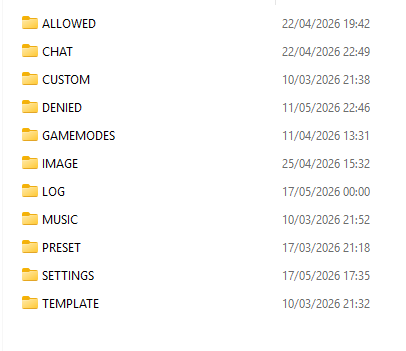
ALLOWED folder
Allowed.txt: contains the list of players added as VIP and/or Moderators.
VIP:
- Exempt from some checks.
- Can be ignored by AFK detect, cam detect, wordlist, spam start and other automatic systems.
Moderators:
- Can manage the lobby with text commands.
- On mobile devices they can use chat commands.
- If they have the mod, they can also use the moderator menu.
Recommended management:
Use the Player UI to add players to this list.
CUSTOM folder
Description: contains local customizations, custom names and cosmetic presets.
CUSTOM\NAME folder
CustomNames.txt: allows you to set the name displayed on known players, if the option is enabled.
Example format:
Player FriendCode:BART
Names.txt: contains names you often use and can set from the main menu.
An example file can be downloaded from the Download section.
CUSTOM\SKINPRESET folder
Function: contains images and outfit options saved through the Skin menu.
Normally, it does not require manual editing.
DENIED folder
BanList.txt: contains banned players if the dedicated option is enabled.
Note:
You can edit it manually in case of incorrect bans, but creating a backup before editing is recommended.
BanModeratorList.txt: contains players banned by moderators.
It is mainly useful to recover player data and manually add it to the main banlist.
BanWords.txt: contains bad words, insults or words you want to forbid.
Cheater.txt: contains the list of possible cheaters.
It works similarly to the banlist, but is designed to better manage false positives.
DenyName.txt: contains offensive names you want to forbid.
SpamStart.txt: contains the most common words used for start spam.
GAMEMODES folder
Function: contains gamemode JSON files.
You can edit these files to create or customize default presets for game modes.
IMAGE folder
Function: contains customizable mod images.
You can edit:
- menu background images;
- cursor images;
- other supported graphic resources.
LOG folder
Function: contains some logs generated by the mod.
It was initially created to support an anticheat system against overload attacks.
Status:
The folder is partly obsolete, but kept for possible future updates.
MUSIC folder
Function: allows you to add music files playable from the mod menu.
Advantage:
You can change music directly in game without switching between apps.
Recommendation:
Do not add too many files, because they may slow down loading or playback.
PRESET folder
Function: contains customizable presets.
It works similarly to the GAMEMODES folder.
SETTINGS folder
Function: contains save files and mod configuration files.
SETTINGS\MENU folder:
Here you can configure MessageMenu buttons for quick texts.
Troubleshooting:
If the mod has errors or strange behavior, the cause is often found in the save files inside this folder.
Recommended solution:
If problems occur, try deleting the entire SETTINGS folder and restarting the game.
Important:
Before deleting it, create a backup of messages or settings you want to keep.
TEMPLATE folder
Function: contains files used for the welcome message and some text commands.
Typical files:
- welcome message template;
- informational command text;
- automatic messages configurable by the host.